
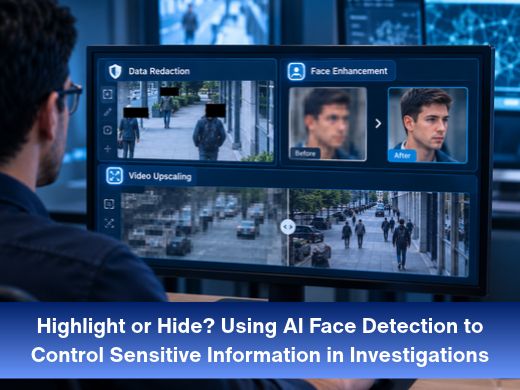
Pull footage from almost any busy street and you’ll find the same problem. The person you need is in the frame. So are plenty of people you don’t.
That tension sits at the center of modern video work. Investigators have to show what matters and protect everyone else while they do it. Cognitech Intelligence handles both jobs with AI face detection. It finds the faces for you, then lets you hide them or highlight them, depending on what the case needs.
Here’s how that works, when to use each option, and what to do when a face is too soft to be useful at all.
Why one video can carry two opposite needs
A single clip often has two jobs. Inside the case, the team wants a clear look at the person of interest. Outside it, whether that’s a shared case file, another agency, or a wider audience, everyone else in the frame has a reasonable expectation of privacy.
Doing that by hand is slow. Someone has to find each face, mark it, and follow it as it moves, frame after frame. One missed frame can undo a lot of careful work.
How Cognitech Intelligence finds faces without manual clicking
Face detection answers one narrow question: is there a human face in this frame, and where? It doesn’t say whose face it is. Identification is a separate step, and keeping the two apart is useful. Detection is the groundwork that makes everything else possible.
Cognitech Intelligence uses deep learning to find human features in video, and it does so automatically. There are no points to click and no outlines to draw. The software locates the faces, then applies whichever filter you choose.
From there you have three paths: hide the faces, highlight them, or enhance them. Let’s take each in turn.
Hide: redaction for bystanders and sensitive details
Redaction is the “hide” side. Faces of bystanders, witnesses, and people in the background are obscured, so they can’t be picked up in the version you share.
Good data redaction software does three things well. It finds every face reliably; it obscures each one cleanly, and it spares you the manual labor. The redaction filter in Cognitech Intelligence runs on the same automatic detection, so the faces it finds are the faces it covers.
Typical situations where redaction earns its place:
- Sharing footage with another agency or department
- Preparing video for release outside the investigation
- Giving reviewers what they need without exposing everyone in the scene
Highlight: keeping every eye on the person of interest
Highlighting is the mirror image. Instead of covering a face, the filter draws attention to it. In a crowded scene, that helps a reviewer or supervisor follow one person through the footage without hunting for them.
It sounds like a small thing. It isn’t when the clip is long and the frame is full.
Because detection does the finding, you can work from the same source footage for both jobs: a protected copy for sharing and a highlighted copy for review.
When the face is too small or too soft: Video Upscaling and Face Enhancement
Detection only helps if there’s something worth showing. A face that’s a few blurry pixels wide won’t tell anyone much, however well it’s outlined.
That’s where upscaling comes in. Video Upscaling raises the resolution of low-quality footage, so small details become easier to see, which is useful in forensic analysis, security, and archival work. There’s also a version that adds Face Enhancement. It upscales the whole frame, then applies extra processing to facial features, so each face is clearer for review and identification.
The before-and-after images on the Cognitech Intelligence page show the effect on a blurred city view and on a group of people outside a restaurant.
Upscaling has limits, of course. It works with what the camera captured, and no software can bring back details that were never recorded. For heavier problems like strong blur or noise, a dedicated video enhancement software such as Video Investigator 64 is built for forensic enhancement and pairs well with this workflow.
Keep the original intact and document what you changed
Any editing footage invites the same question: what did you change? Redaction and enhancement are legitimate steps, but they hold best when the original stays untouched, and every step can be explained.
Work on copies. Note which filters you used and in what order. Check that the source file hasn’t been altered. Your agency’s policies and local rules decide the exact requirements, so follow those first.
For the verification side, image authentication software helps you check images and document your findings. If you want enhancement and analysis in one suite, forensic video analysis tools like Cognitech TriSuite 64 bring them together.
Who can use Cognitech Intelligence
The software is intended solely for trained professionals. According to Cognitech, only government agencies, qualified organizations and businesses, and their designated specialists can apply for access. Non-professionals can’t.
Cognitech builds forensic video analysis software for exactly these teams, so if that describes yours, the next step is straightforward.
The takeaway
Faces in video are either evidence or someone’s privacy, and often both. Automatic AI detection means you don’t have to trade speed for care. One pass finds the faces, and you decide whether each one gets hidden, highlighted, or sharpened.
To see the filters in action, including the before-and-after examples, visit the Cognitech Intelligence page.
FAQs
- What is AI face detection in investigations?
It’s software that scans video for human faces and marks where they appear. In Cognitech Intelligence, it uses deep learning and runs automatically, so there’s no manual point-clicking. - Is face detection the same as face recognition?
No. Detection finds faces in a frame. Recognition tries to work out whose face it is. Detection is the first step that makes tasks like redaction and highlighting possible. - What does data redaction software do for video?
It obscures sensitive information, such as the faces of bystanders, so footage can be shared without exposing people who aren’t part of the case. - Can low-resolution videos really be improved?
Upscaling can make small details easier to see, and Face Enhancement adds extra processing for faces. Results depend on the source of footage, though. No tool can recover details the camera never captured. - Who can get access to Cognitech Intelligence?
Government agencies, qualified organizations and businesses, and their designated specialists. It’s not available to non-professionals.