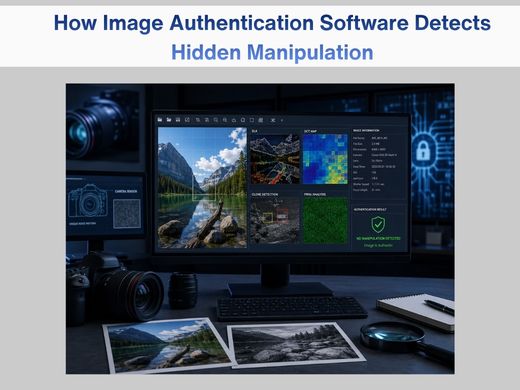
How Image Authentication Software Detects Hidden Manipulation

Image Authentication SoftwareDigital photos feel simple. You take one, save it, and share it. But once a photo becomes evidence in a real case, it stops being “just a picture.” Every pixel starts to matter. That’s the whole reason image authentication software exists, it looks past what our eyes can see and digs into the tiny details buried inside the file itself. 

Tools like Cognitech FiA 64 are built for exactly this. They help investigators figure out whether a photo is genuine, lightly edited, or fully staged. And honestly, once you understand how much information is packed into a single image file, it’s kind of amazing how much a photo can tell you. 

Why Authenticating an Image Even Matters ?

Picture a crime scene. One photo can shape the entire case; it can pin down a timeline, confirm an object was there, or place a person at the scene. But if that photo was edited even slightly, it can send the whole investigation in the wrong direction. 

That’s why forensic teams don’t just take photos at face value. They verify it. 

Image authentication software checks whether a photo is still in its original state, and looks for signs of cropping, pasting, editing, or recompression. When something looks off, analysts know exactly where to dig deeper. This kind of scrutiny works hand in hand with broader forensic video analysis software, since investigators are rarely working with just one image, they’re usually piecing together footage and stills from the same case. 

The Hidden Data Inside Every Photo 

Most people think of a photo as well, just a picture. But every digital image carries layers of data that most of us never see. 

Here are a few examples: 

  • EXIF metadata — This records the camera model, date, time, and whether flash was used. If one photo has Samsung metadata and the next has Apple metadata, but both are supposedly from the same moment, that’s a red flag. 
  • File structure — Every image file follows a pattern. If part of the image was touched up in a different program, that pattern can shift. 
  • JPEG compression artifacts — Saving a photo leaves behind compression marks. Those marks should be consistent throughout the image. If one section looks different from the rest, it may have been altered later. 

Cognitech FiA 64 reads all these digital breadcrumbs; the small traces that simple editing software leaves behind whether it means to or not.
Image Authentication Software

How Image Authentication Software Spots Manipulation 

Good editing is supposed to look invisible. But even the cleanest edit leaves a trace somewhere, and FiA 64 is built to find it. 

Here’s how it does that: 

  • Error Level Analysis (ELA) — ELA looks at how much each part of an image shifts when it’s compressed again. Untouched areas should react consistently. Edited areas react differently. So, if someone pasted in a new face, added a weapon, or swapped out a background, ELA lights up that exact spot. 
  • DCT Maps — JPEGs break images into small blocks using something called Discrete Cosine Transform, or DCT. Even editing a handful of pixels changes the pattern in those blocks. DCT maps help analysts spot blocks that don’t match the rest of the image. 
  • Clone Detection — This one comes up more than you’d think. Someone hides part of an image by copying a nearby area and pasting it over the top. Clone detection catches those repeated textures or patterns, even ones invisible to the naked eye. 
  • PRNU Sensor Matching — Think of PRNU as a camera fingerprint. Every sensor produces a unique noise pattern, and no two cameras produce the same one. FiA 64 checks whether the noise pattern in a photo actually matches the camera it’s supposedly from. If it doesn’t match, the photo probably didn’t come from that device. 

This last method carries real weight, and it’s often used in court to confirm that a photo is exactly what it claims to be. 

Finding Recompression and File Tampering 

Sometimes a photo gets edited and then saved again to cover the tracks. But recompression almost always leaves a mark of uneven noise, mismatched patterns, or gaps in the metadata. 

FiA 64 is good at catching this. It can pinpoint where the recompression happened and flag what looks unusual about it, which helps analysts understand not just if an image was edited, but how. That same attention to detail carries over into video enhancement software, where frame-by-frame footage often needs the same kind of tampering checks.

Why FiA 64 Is Built for Professionals? 

Cognitech FiA 64 isn’t something you’d casually download and start clicking around in. It’s built for: 

  • law enforcement 
  • forensic analysts 
  • government agencies 

The tools are advanced, and getting a reliable result takes real training. You need to know how to read the signals correctly and back up your conclusions with solid methodology — which is also why agencies pair it with cloud forensics tools, so teams can collaborate on the same case files securely. 
But the payoff is worth it: FiA 64 produces court-ready results. That means the reports it generates hold up in legal settings and meet the standards forensic evidence is expected to meet. When a case can hinge on a single image, that level of trust isn’t optional. 

Image Authentication Helps Protect the Truth

Between filters, edits, deepfakes, and AI-generated images, manipulated photos spread faster than ever. But in an investigation, there’s no room for a blurry version of the truth. 

Image authentication software gives experts the tools to check every pixel, every compression block, and every scrap of metadata — making sure the images used in court actually tell the story they claim to. In cases that also involve scene measurements, teams often lean on photogrammetry software to reconstruct distances and object placement alongside the image analysis itself. 

Some cases also call for a closer look at footage rather than stills, which is where video forensic analysis tools come in — capturing and processing video evidence the same way FiA 64 handles photos. And for teams juggling both video and image work on the same case, an all-in-one setup like forensic video analysis software can tie the whole workflow together. 

If you work in forensics, digital evidence, or law enforcement, tools like Cognitech FiA 64 genuinely earn their place in your toolkit. They give you confidence in the images you’re relying on every single day, and teams looking to add AI-assisted enhancement into the mix, Cognitech Intelligence rounds that out with face enhancement and video upscaling. 

Want to talk about what fits your team? Contact Cognitech and we’ll help you find the right setup. Thanks for reading, stick around for more, and follow us on Twitter, Facebook, Instagram, LinkedIn, or YouTube so you never miss a post. 

FAQs

  1. What is image authentication software?
    It’s a tool that checks whether a digital image has been edited, altered, or manipulated in some way. It looks at metadata, compression patterns, and sensor noise to confirm that the image is genuine. 
  2. How doesCognitechFiA 64 detect hidden manipulation?  
    It uses ELA, DCT maps, clone detection, and PRNU camera matching to catch signs of editing, recompression, or file tampering. 
  3. Why is image authentication important in investigations?
    Because photos can shape the outcome of a case. Authenticating them makes sure the evidence is real, untouched, and reliable before it ever reaches a courtroom.