
Image Authentication Software: How Do Investigators Verify Evidence?
Blog Summary: This article walks through what image authentication software does, how it catches manipulation in digital images, and why that process matters once a photo is being used as evidence. It covers the technical detection methods, where authentication sits inside a bigger forensic workflow, and what separates a finding that survives cross-examination from one that gets picked apart.
What Image Authentication Software Actually Does
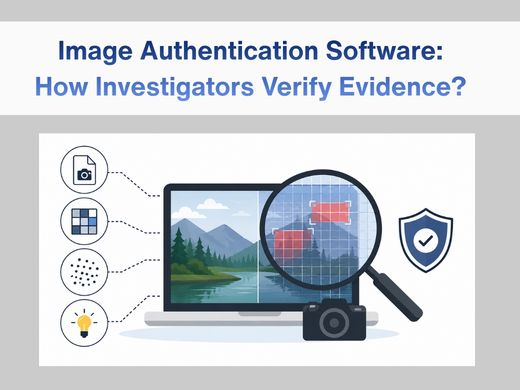
At its core, image authentication software probes a digital image from a few different angles like file structure, metadata, pixel behavior, and looks for anything that doesn’t add up. It’s not trying to improve the image. That’s what image enhancement is for, and that’s a separate discipline: enhancement sharpens or clarifies content that’s already known to be authentic.
Authentication, on the other hand, is building an argument. Sometimes for an image’s integrity, sometimes against it. A few things it typically checks:
- Whether the file structure and metadata line up with an unedited original
- Whether compression patterns look consistent across the whole frame
- Whether pixel-level noise behaves the same way in every region
- Whether shadows, lighting, and geometry make sense together
None of this end in a casual “yep, looks fine” verdict. A real authentication finding is documented step by step; in a way another examiner could redo and land on the same conclusion.
How Tampering Actually Gets Caught
- Metadata and File Structure
Every digital photo holds a bit of history; camera model, timestamp, sometimes location data, and a record of how it’s been compressed. Authentication software checks whether that trail looks intact or whether it shows the fingerprints of having been opened and re-saved in editing software. A mismatch isn’t automatically proof of fraud, to be clear. But it’s the kind of thing that earns a second, closer look.
- Error Level Analysis and Pixel Consistency
Here’s the part that trips up most tampering attempts: when someone edits part of an image and saves it again, that section usually compresses a little differently than the untouched parts around it. Error level analysis is built to surface exactly that — regions of an image behaving unlike their neighbors. Pair that with noise pattern analysis and you get one of the more dependable ways to spot localized editing that would otherwise be invisible to the eye.
- Camera Calibration and Lens Correction
This is where authentication starts to overlap with optics. Every lens bends light in a specific, measurable way with its own distortion signature. If the geometry in an image doesn’t match the distortion profile of the camera it’s supposedly from, that’s worth flagging. It’s also where authentication brushes up against photogrammetry, since any measurement of distances, dimensions, or positions will depend entirely on trusting the camera’s true optical characteristics first.
Where This Fits into a Bigger Forensic Workflow
Authentication almost never happens in isolation. It’s usually one piece of a case that also involves:
- Clarifying footage tied to the same incident, often through video enhancement software
- Reviewing frame-by-frame continuity with video forensic analysis tools
- Running the full case — enhancement, authentication, and measurement together through something like Cognitech TriSuite
- Handling evidence remotely when a team can’t all be in the same lab, using cloud forensics infrastructure
In practice, most investigators bounce between authentication and forensic video analysis constantly, since a single case rarely stays confined to just still photos or just footage.
Authentication vs. Enhancement Not the Same Job
People mix these up all the time, so it’s worth being blunt about it.
Enhancement makes real content easier to see. It sharpens a blurry face, brightens a dark frame, and steadies shaky footage. It works on content that’s already trusted.
Authentication asks something else entirely: is this content trustworthy in the first place? An enhanced image can still be completely authentic. A pristine, untouched-looking image can still be fake. Treat these two as interchangeable, and you either end up with weak evidence sitting in a courtroom, or strong evidence getting tossed out because nobody bothered to prove it was real.
Why Crime Scene Investigators Actually Need This
A crime scene investigator isn’t just collecting photos to fill a folder. They’re building a record that must hold up for months, sometimes years, after the fact — long after memories have faded, and the only thing left is the file itself. Digital images are easy to fake convincingly, and without a documented authentication process behind a photo, there’s no real answer when someone claims it was staged or pulled from somewhere else.
This is usually where crime scene video analysis and image authentication end up working side by side — one confirms the footage is legitimate, the other does the same for still photos, and together they close a gap that opposing counsel would otherwise happily walk through.
What Actually Holds Up in Court
Judges don’t accept “the software flagged it” as an answer, and they shouldn’t. What tends to survive scrutiny:
- A methodology that’s written down, not just implied
- Results another qualified examiner could reproduce independently
- A clear line between what was observed and what was concluded from it
- No reliance on a black-box output with nothing behind it
Software is a tool an examiner uses; it’s not a substitute for their judgment. Both need to be in the room for a finding to survive a Daubert or Frye challenge, and honestly, most legal pushback targets exactly the gap where one of those two is missing.
What to Actually Look for in a Tool
If you’re the one evaluating software for a lab or department, skip past the feature list for a second and ask these instead:
- Can you actually see how it reached a conclusion, or is it a sealed box that just spits out a verdict?
- Does it fit into workflows you’re already running, including enhancement tools already in use?
- Has the methodology behind it been tested and accepted in prior proceedings?
- Does it account for camera- and lens-specific calibration, or does it treat every image the same?
- Does it preserve a clean chain of custody from the moment evidence is loaded to the final report?
A tool that holds up on all five of these saves an examiner from having to defend the software itself, on top of defending the findings.
Conclusion
Image authentication isn’t a box to check at the end of a case file — it’s often the reason a piece of evidence survives cross-examination instead of quietly disappearing from the record. The point was never to make a photo look convincing. It’s to prove, in a way that can be redone and defended, that what the camera captured is what’s being shown now.
For teams already leaning on forensic video analysis or video enhancement tools, adding a real authentication step closes a gap that opposing counsel will absolutely go looking for if it’s left open.
Talk with experts for Forensic video Processing Software and Forensic Image Processing Software solutions. Contact Cognitech! We hope you enjoyed this Blog! Stay tuned, and don’t miss the coming blogs. You can follow us on Twitter, Facebook, Instagram, Linkedin, or Youtube: we post Community Blogs regularly so you won’t miss any!
FAQs
Does image authentication software prove an image is 100% real?
No, and any tool claiming that should raise an eyebrow. What it gives you is a set of technical indicators — metadata consistency, compression behavior, calibration matches — that a qualified examiner then interprets and writes up as part of a larger finding.Is image authentication the same thing as image enhancement?
No. Enhancement makes real content easier to see. Authentication checks whether that content has actually been altered. A photo can be enhanced and still fail authentication or look completely untouched and still get flagged for a data inconsistency underneath.Can this be used on video frames, not just still photos?
Yes, and it usually is. Frame-level authentication tends to run alongside broader video forensic analysis whenever a case involves both surveillance footage and still images, which is most of the time.Why does camera calibration even matter here?
Because every lens distorts light in its own predictable way. If an image’s geometry doesn’t match what you’d expect from its claimed source camera, that’s a real, technical flag — not a guess.Will an authentication finding hold up in court by itself?
Only if the methodology behind it is written down, reproducible, and explained by someone qualified to defend it. An unverified software output on its own won’t get you very far.